Everything it does, on real screens.
Twelve sheets, in the order the work happens. Every screen here is the app as it is today, on demonstration data, and every claim is one the app's own manual makes.
Grade the steel, measure it, and keep the surveyor's call.
The survey is where a maintenance programme starts: what's there, what condition it's in, how much of it there is, and how soon it needs work.
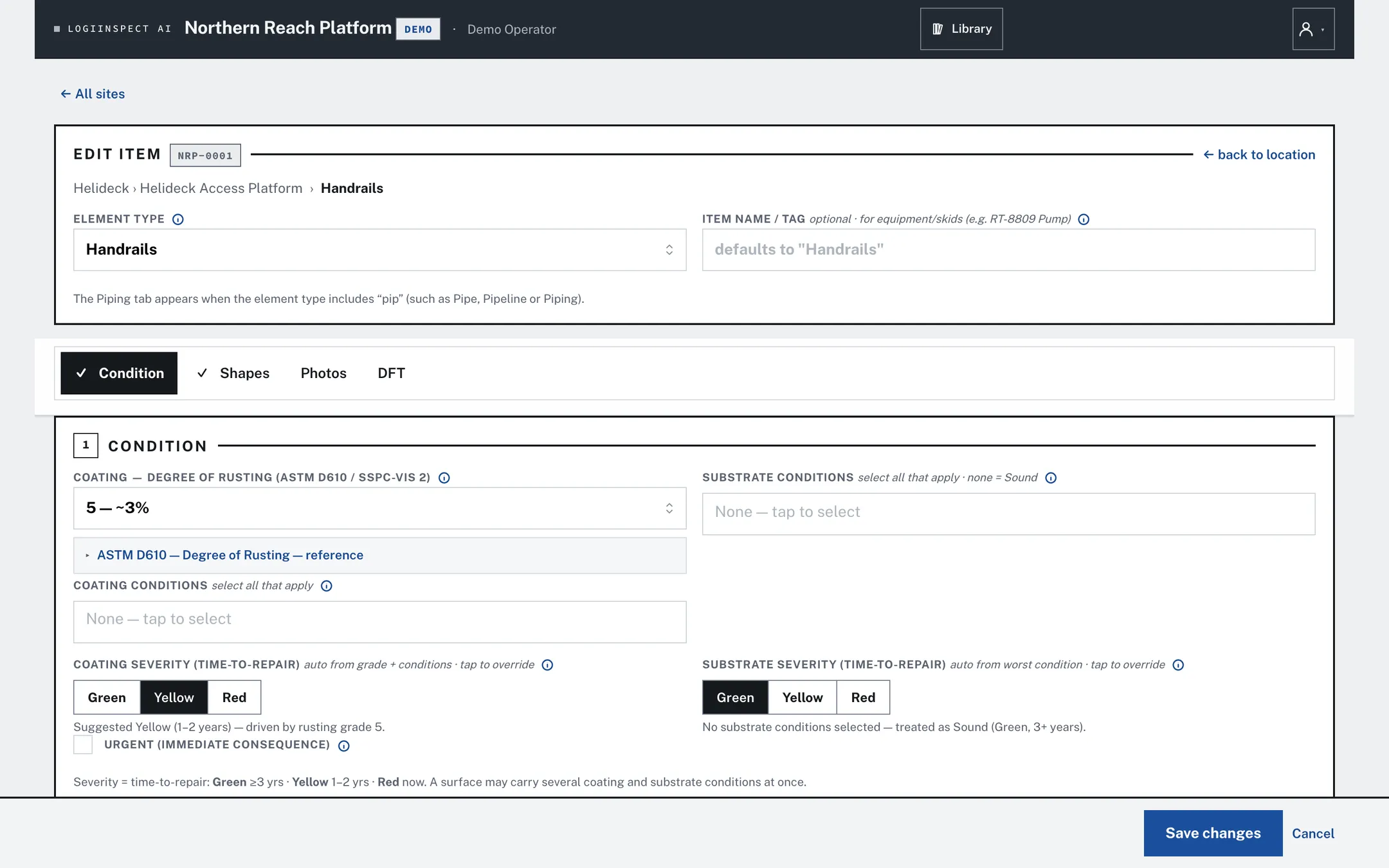
- Grade against the standard, not memory. ASTM D610 rust grade with its reference card on screen, plus the coating and substrate conditions from your own lists.
- Red, yellow, green as time to repair. Green 3+ years, yellow 1–2, red now. The app suggests one from the grade; the surveyor decides.
- An urgent flag for anything with an immediate consequence.
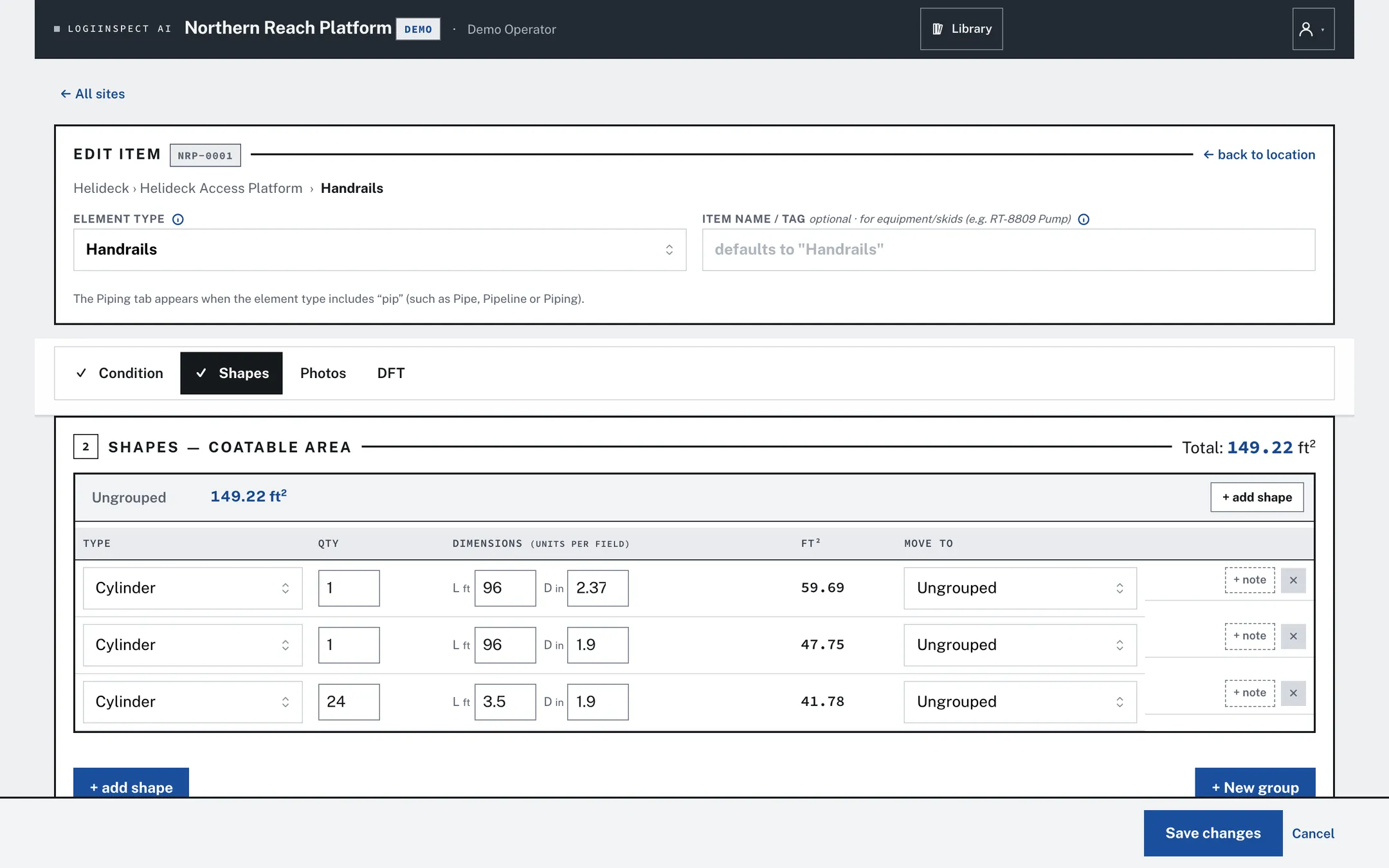
- Coatable area from shapes. Rectangle, panel, channel, angle, I-beam, tee or cylinder: type the dimensions and the square footage works itself out.
- The surveyor's grade is kept. The office can amend a call; the original stays in the item's condition history.
- Re-survey without retyping. Start from the last survey and change what changed.
Every coat, at every hold point, checked as it's entered.
An inspection follows the stage: surface preparation, or a coat going on. Each tab holds one instrument's readings, and the specification checks run beside them.
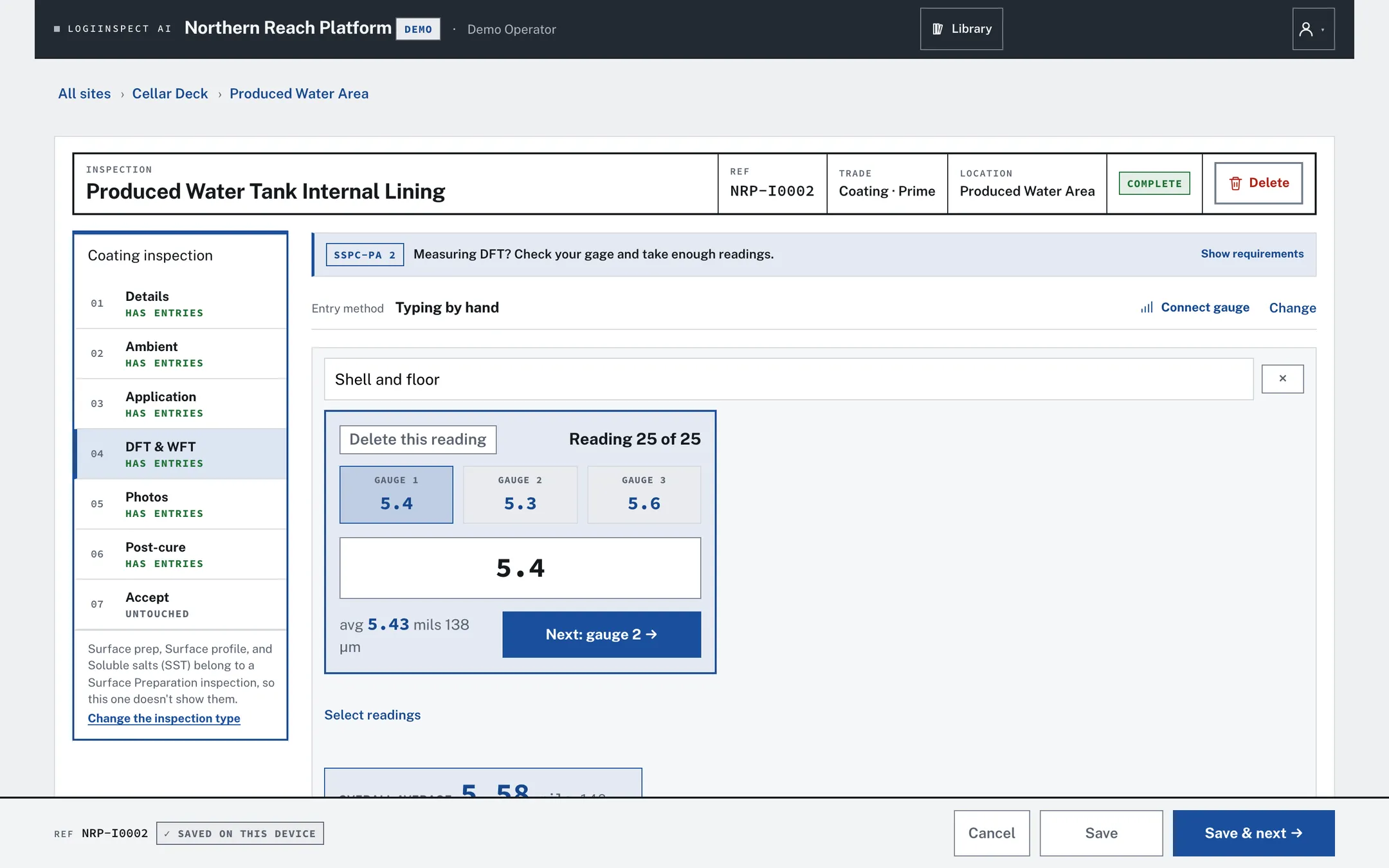
- Surface prep: the standard achieved (SSPC, NACE, ISO, waterjet), profile and method, soluble salts, dust, compressed air, abrasive, and the blast window that starts the blast-to-coat clock.
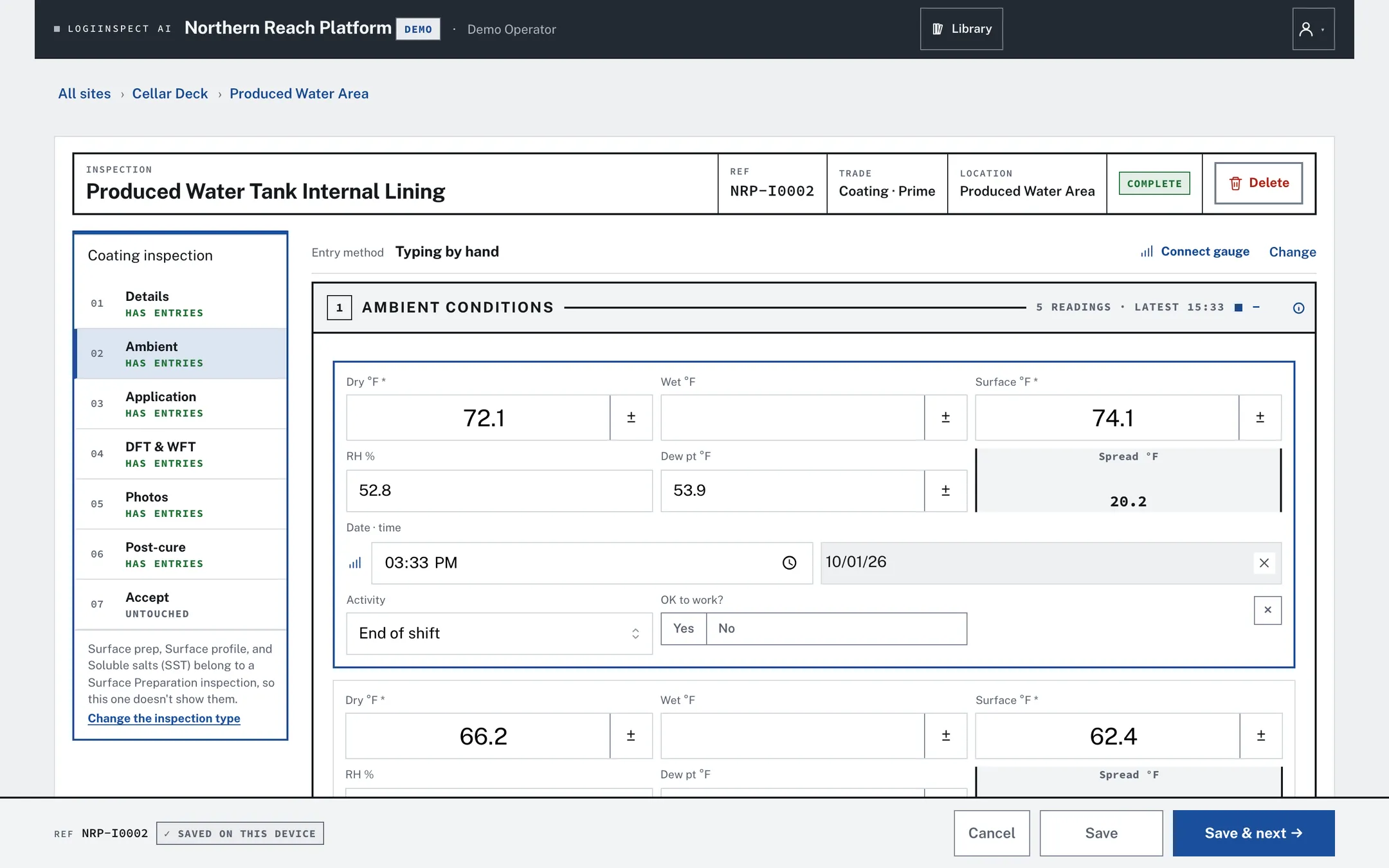
- Ambient: typed off a sling psychrometer or electronic meter, logged live from a dew-point gauge, or imported from its report.
- Application: product, batches, mixing, wet film and who applied it.
- DFT: spot by spot, with the spec's 90/10 rule and SSPC-PA 2's spot and area pattern.
- Post-cure: cure, holiday test (wet sponge or spark), adhesion and MEK rub, defects after cure.
- Checks flag, they never block. Dew-point margin, DFT, profile, salt and prep standard are checked against the spec; a short reading is saved and flagged, never refused.
- Acceptance is declared. Not started, in progress, QC passed, accepted, accepted with comments, or rejected, each stamped with who and when.
- Hold, witness and review points from the site's inspection and test plan.
Read it off the gauge. Or type it in.
Every value has a box a person can type into, with no gauge, pairing or import first. The instrument is the thing most likely to be flat, unpaired or in someone else's hand.
| Live, over Bluetooth | DeFelsko PosiTector gauges: DFT and surface-profile spot grids, the dew-point meter's live readings, and soluble-salt readings read back in batches. Pair once a shift; it stays paired from tank to tank. |
| Import the report | The PDF that PosiSoft exports from the gauge, for DFT and for dew-point runs. |
| Type it in | Spot by spot, or the gauge's own average, high, low and count. Always available. |
| Gauge checks | Start- and end-of-shift checks against a reference, and a calibration record on each reading group, printed on the report. |
Photos that stay with the steel, and AI you can overrule.
Every photo belongs to an inspection or survey item, and every AI suggestion waits for a person to accept it.
- Mark up a photo to show the defect, and pair before-and-after shots of the same spot.
- Group photos, keep problem shots in a Defects group, and keep a photo owner-only when it shouldn't print.
- Choose which photo groups print on each report.
- AI suggestions: a caption for a photo, a second opinion on a hold point, the batch number read off a can label, a specification parsed from its PDF, and a draft of the daily summary.
- The inspector decides. Accept, change or ignore. The AI never stamps a gate or signs anything.
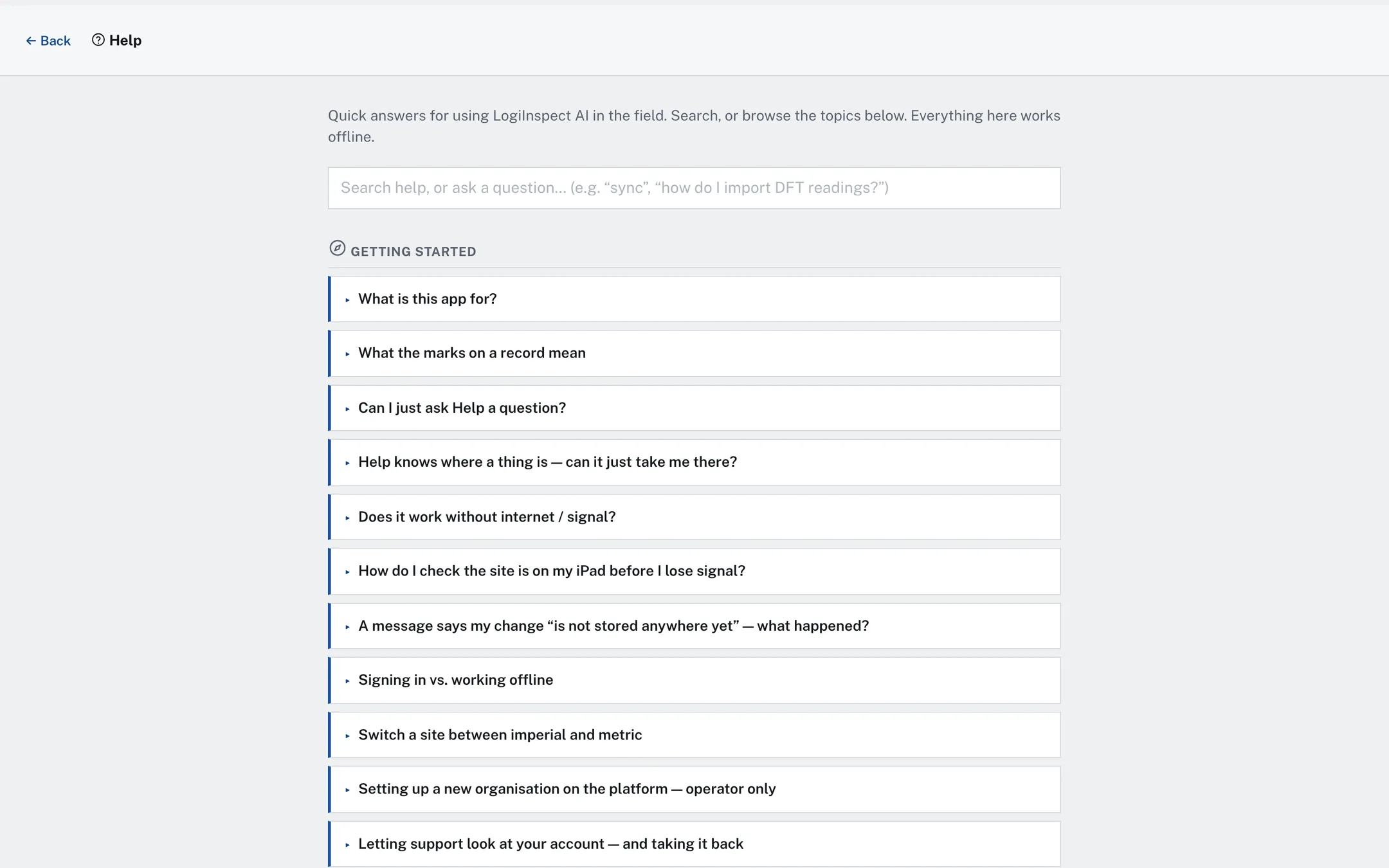
- Help answers questions in plain words, and the account can run with AI switched off.
Findings that close with a signature.
A finding is raised against an inspection, often straight from a check that wasn't met. It carries who raised it and when, and closes only with what was done and a signature.
- Close, or accept a deviation. If the spec wasn't met on purpose, accept the deviation and say why, on the record.
- Punch list: every open finding on the project in one table, with assignee and due date.
- NCRs: written, issued to the yard and cleared only when the fix is accepted, each with its own link.
- Each record keeps its own findings. A finding raised on one inspection is never copied onto another.
Run the job from the office, off the same record.
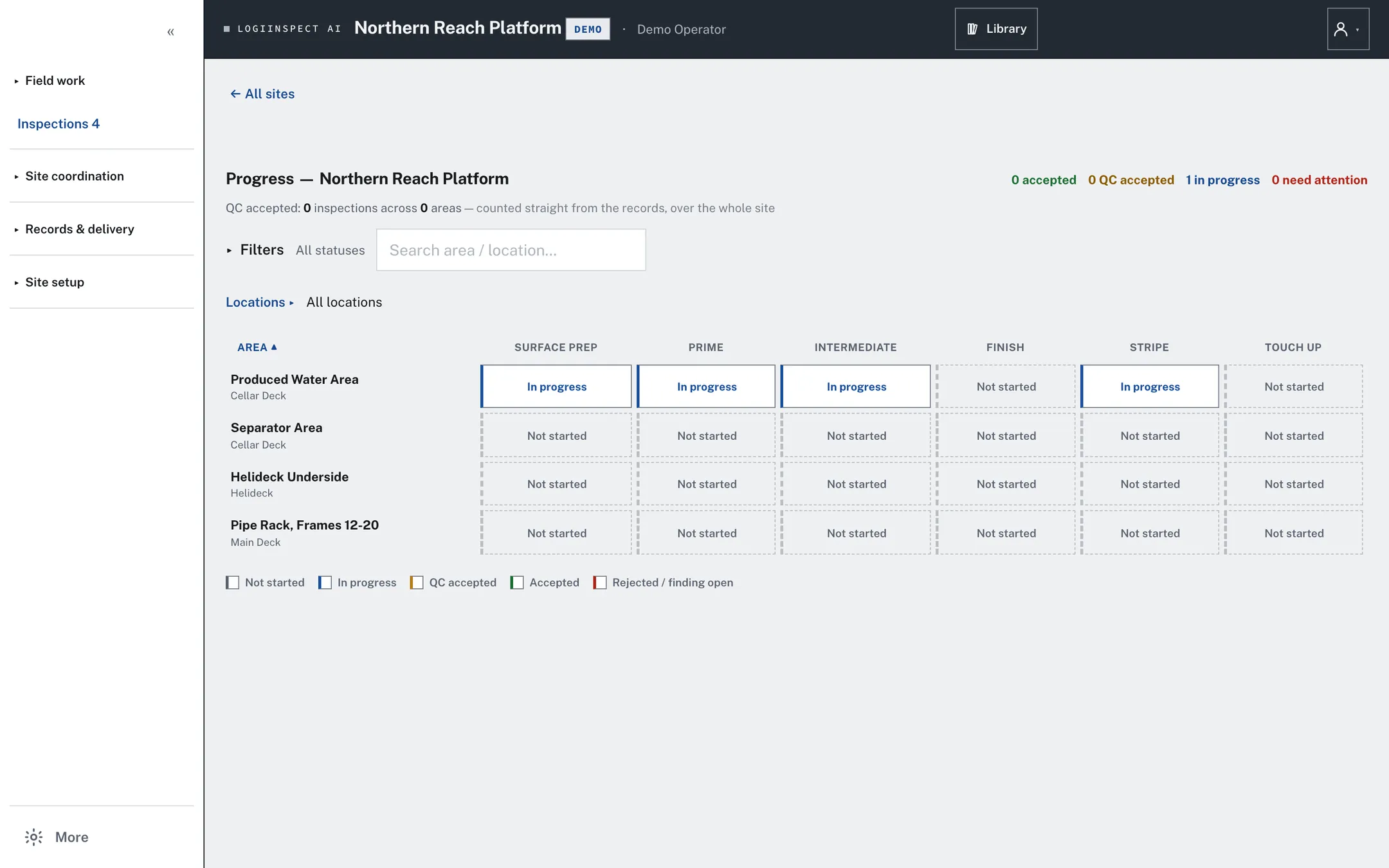
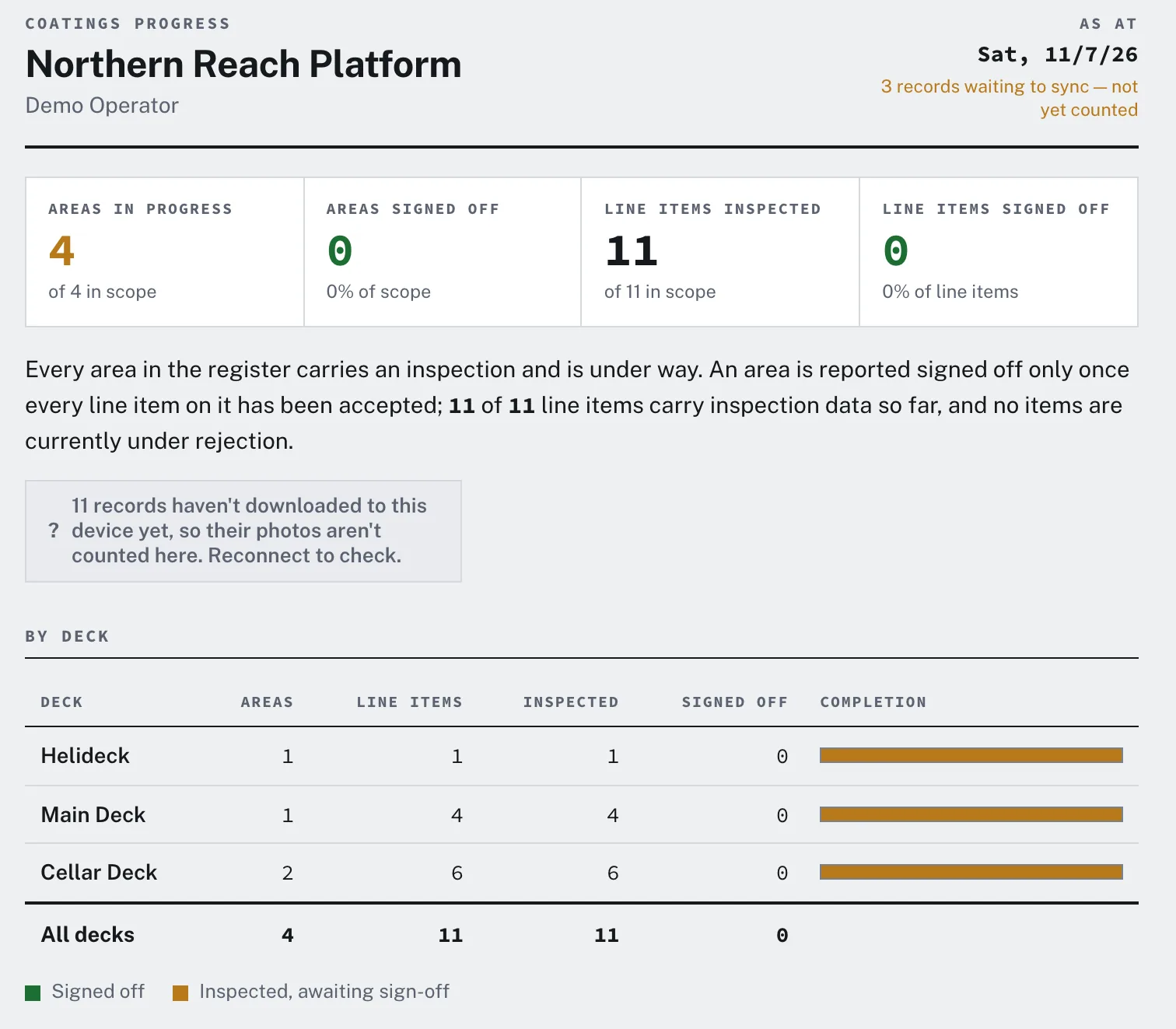
Nothing is retyped between the field and the office. What the inspector saved is what the matrix colors, what the punch list counts and what the customer reads.
| Screen | Answers |
|---|---|
| Overview | How far along are we? Areas under way and signed off, by deck or area. |
| Matrix | Where does every area stand on every coat? |
| Tank Tracker | Where is every tank in the painting scope, including the ones nobody has touched yet? |
| Drawing view | Status painted onto the General Arrangement plans, deck by deck, where a drawing is loaded. |
| Punch list | Every open finding on the project in one table, with who owes it and when. |
| NCRs | Non-conformity reports written, issued and cleared once the fix is accepted. |
| Daily | Today's, this week's or any range of records, sent as an email or a PDF. |
| Materials | Paint lots received, issued, returned and held, by product, batch and expiry. |
| Estimating | Measured area turned into man-hours and dollars from your own rate card. |
| Activity | Who created or edited which inspection, and when. |
See who is actually using it
Invite people, set their role and their sites. Each name carries a badge:
ActiveIdle 52dNever signed in
Yard QC and owner's rep, kept apart
Set which side each company holds on each job. Each side keeps its own records, and every change to a person's name, role or company is kept in their history.
A window, not the keys
A viewer login lands on the Overview and nothing else. A read-only reviewer can open inspections without changing them.
Crews and supervisors talk on the Board.
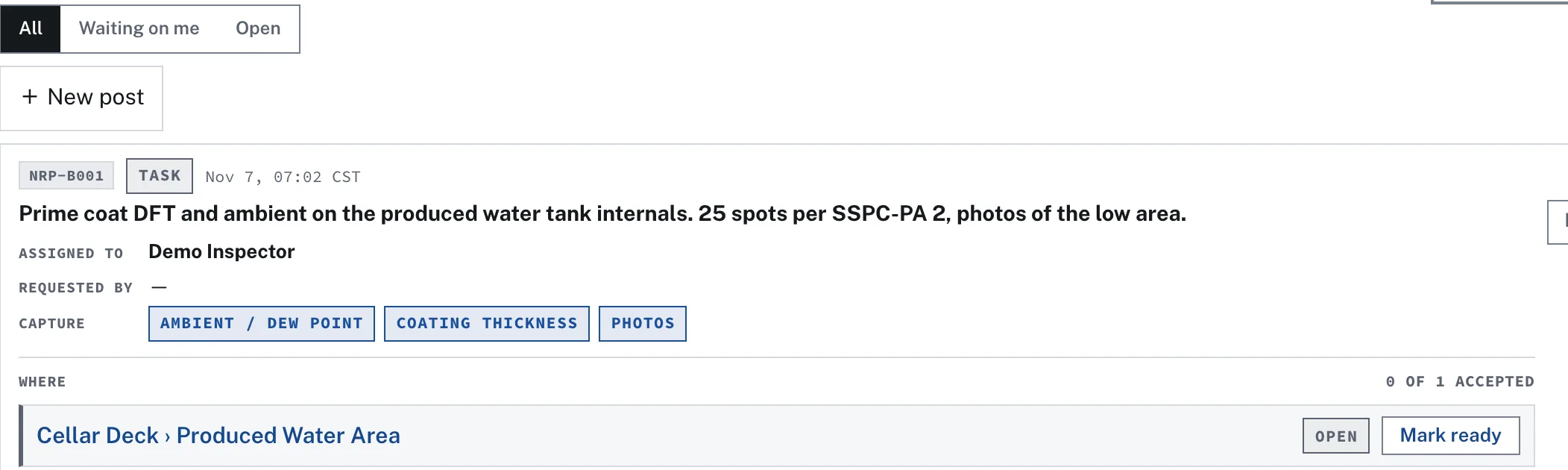
Notes, hand-offs and tasks, each with a short ID people can quote. A task can cover one tank or a whole deck, and every place on it moves from open to ready to accepted on its own.
- Say what to bring back. Tick the data you want: ambient, surface prep, profile, salt, DFT, photos, stage sign-off.
- It works with no signal. Posts, replies and photos wait on the device and send themselves when the signal returns.
- Attach the evidence. Photos, PosiTector or PosiSoft reports and documents ride on the post.
- My shift opens on what is waiting on you: the inspection you left part-way, and the Board tasks assigned to you.
Post
The supervisor names the tank, the person and the readings wanted.
Alert
The assignee's iPhone or browser shows it, even with the app closed.
Ready
The crew marks the area ready, with the photos or gauge report attached.
Accepted
The supervisor accepts each place in turn, and the task counts them.
The morning briefing, kept as a record.
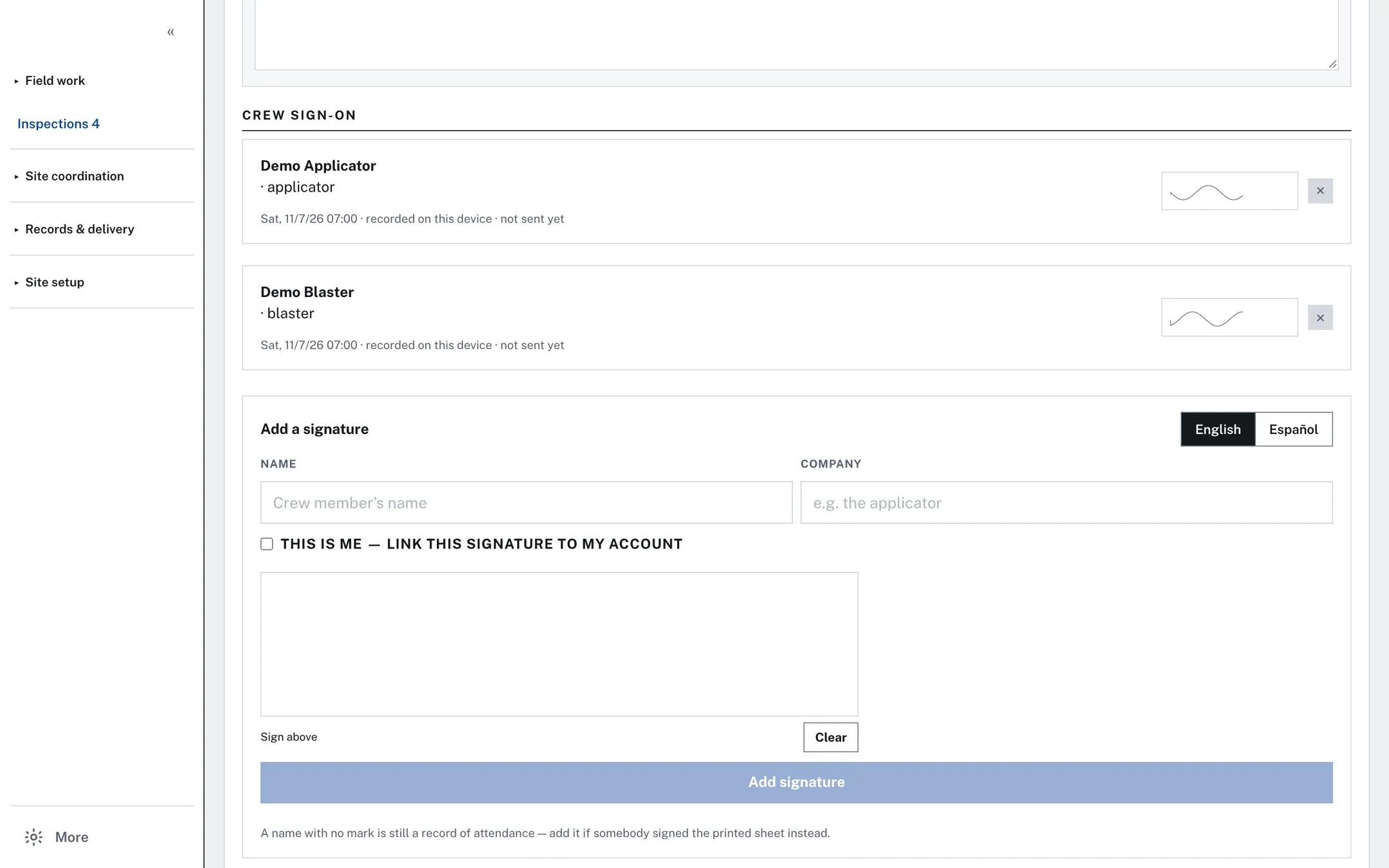
One JSA per site per day. Months later you can open the 14th and see what the crew was briefed on and who signed on.
- Start from yesterday's plan or the coatings template, and change what's different today.
- Crew signs on the iPad, in English or Spanish, with the time they signed.
- Print it with every sign-on, plus ruled lines for anyone signing paper.
- Permits and PPE start blank on purpose: an N/A is somebody's decision.
Pick the items, fill the sixteen-section standard workpack with its twenty-nine permit and approval lines, and issue it. Answers save as you type. Issued means frozen: a change goes out as the next revision.
| Rev | Status | Note |
|---|
Scope it, price it, and show which revision was priced.
Workpacks come from the surveyed items; estimates come from their measured area and your own production rates.
- Your rate card: operations named the way you bid them, with square feet per man-hour and dollars per man-hour.
- Price by severity band: tick the reds, the yellows or both; the area adds up from the items' shapes.
- The estimate records the revision it priced, and a re-scoped workpack is called out.
- The app never invents a production rate. The figures are yours.
Reports printed the way your customer asked.
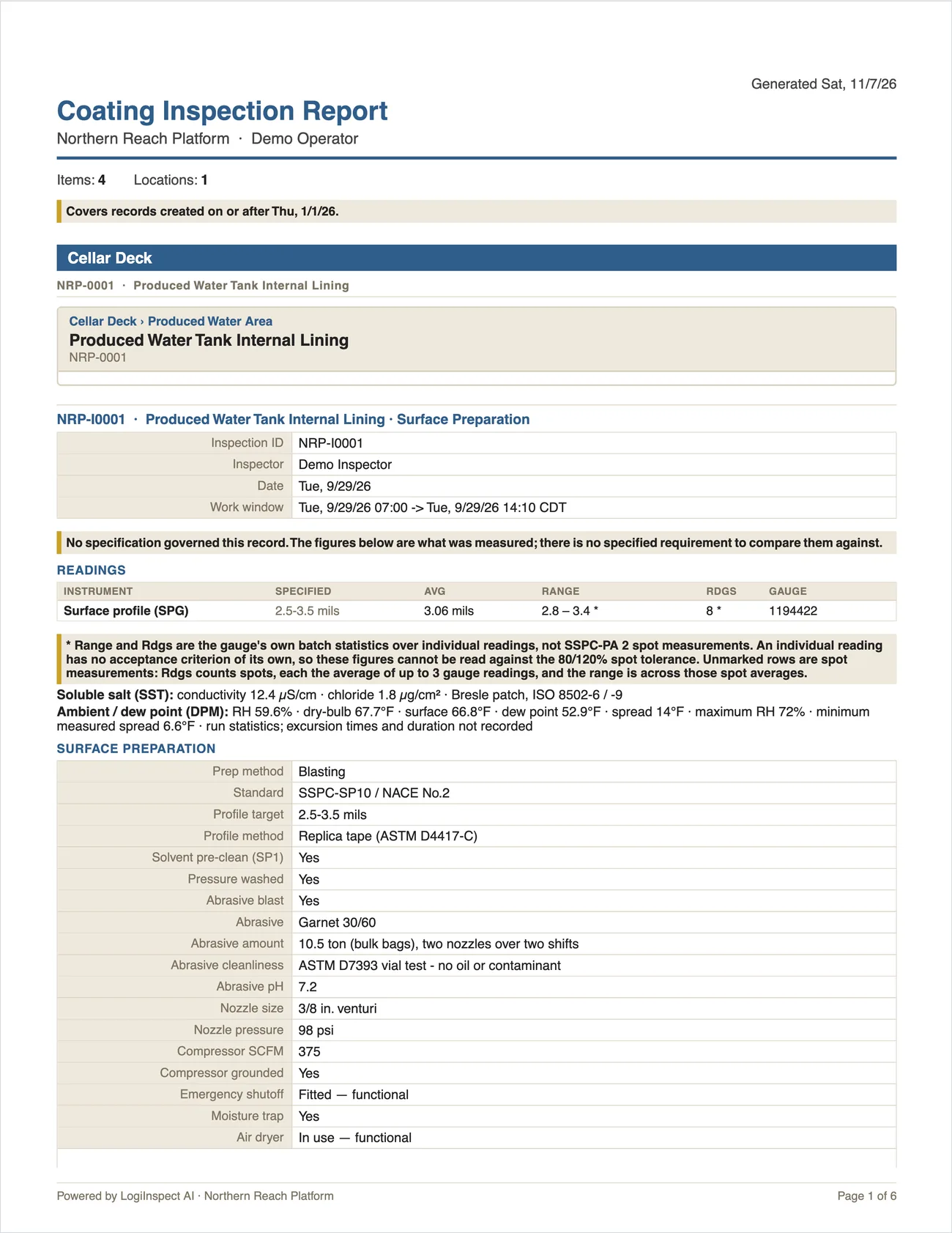
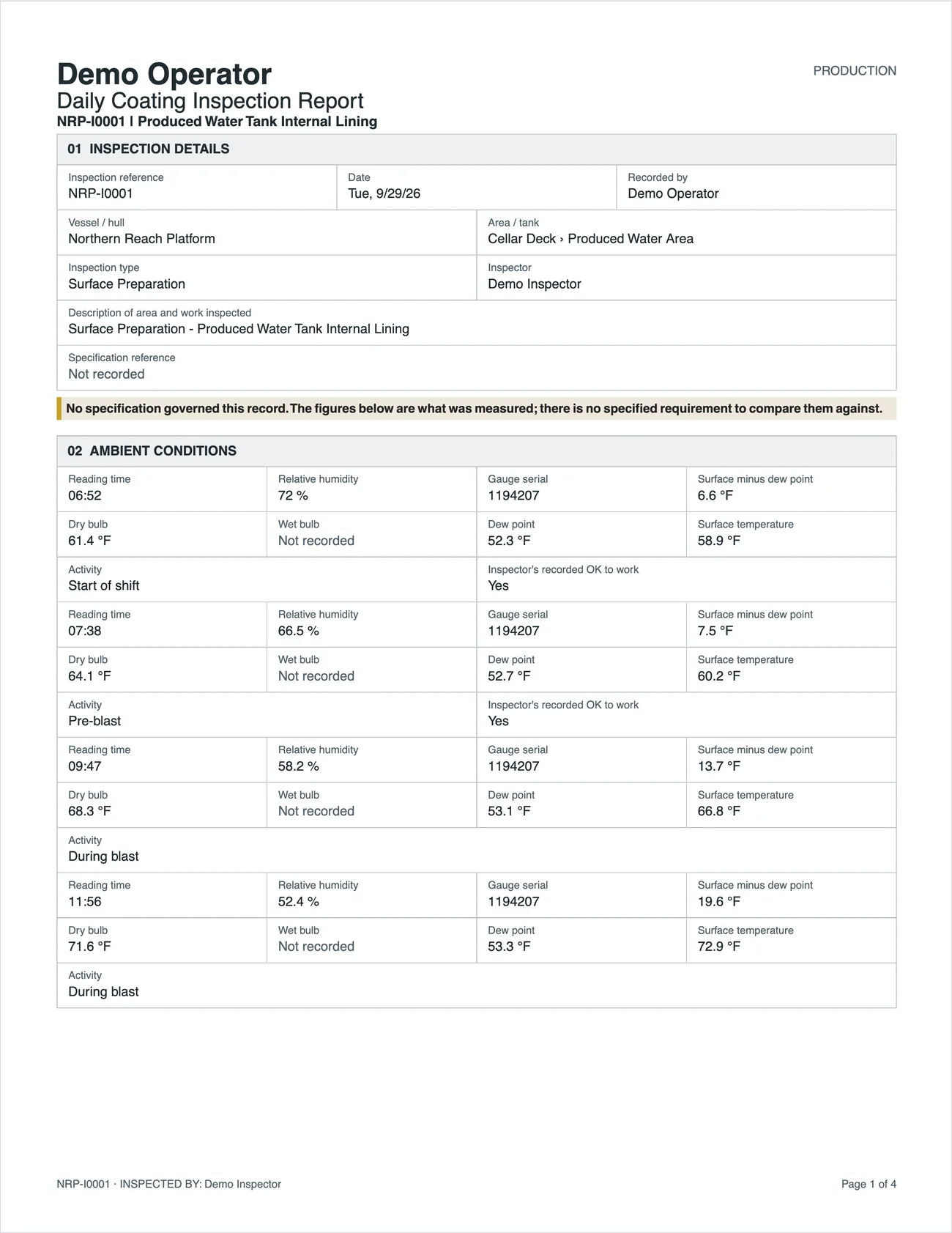
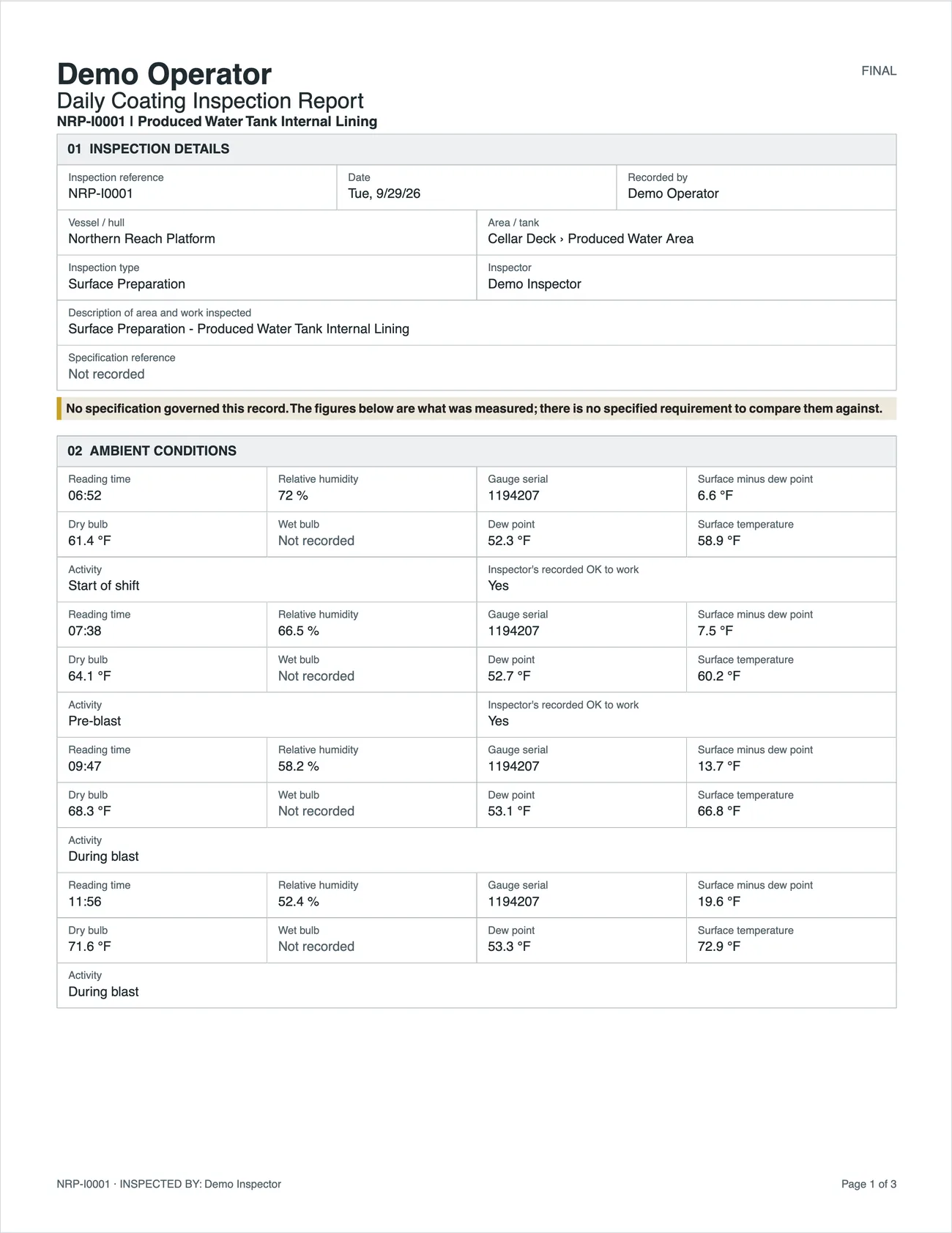
Choose the layout and what goes on it, report by report, or set the defaults once per site. Try the choices; the pages are real.
Your Excel form, filled
Type tags like {{inspection.inspector}} into your own layout. Each inspection comes out as a finished PDF in your format, photos appended.
Filed by deck and section
Saved reports file themselves. An approver makes one permanent when it goes to the client, and after that nobody can swap the PDF behind it.
The register as a spreadsheet
Every row you're looking at, one file, with the unit named in every column heading.
The job's records as a ZIP
Surveys, elements, inspections, readings, gates and findings as spreadsheets, with a manifest of what was exported, by whom and when.
Samples, not real inspection records: the app printed them from Northern Reach, a fictional demonstration platform. The demonstration copy has no specification loaded, so these pages say "no specification governed this record" where a live job prints the spec's own figures beside each reading.
Set every site up your way.
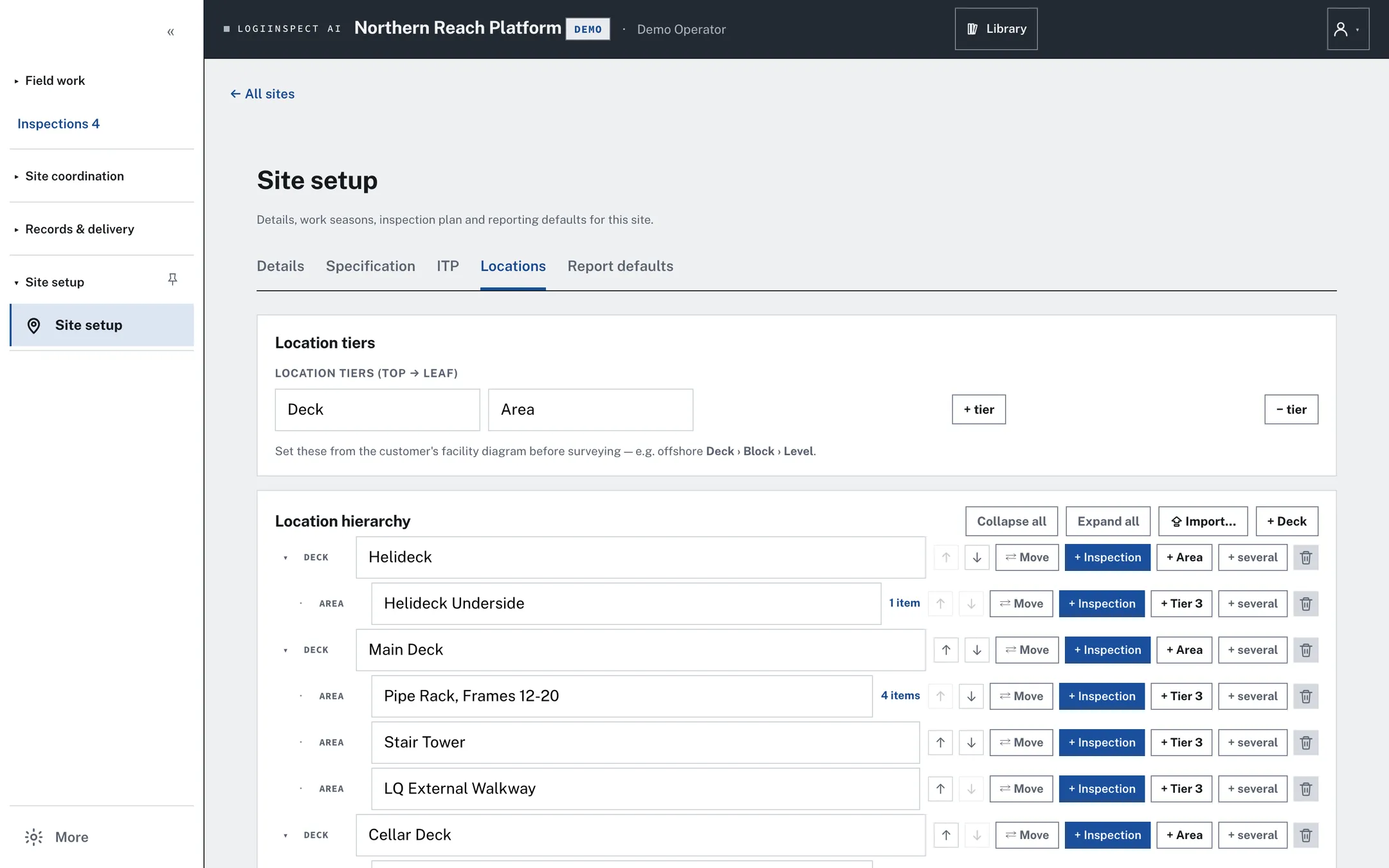
A site's shape isn't fixed. You name the levels of the location tree and how deep it goes, and the pickers offer your own lists.
| Setting | What it controls |
|---|---|
| Location tree | Tier names and depth. Built by hand or pasted in from an Excel grid. Per site. |
| Your lists | Element types and coating and substrate conditions the pickers offer. Account-wide. |
| Specification | The contract spec each site is checked against, imported from its PDF. Per site. |
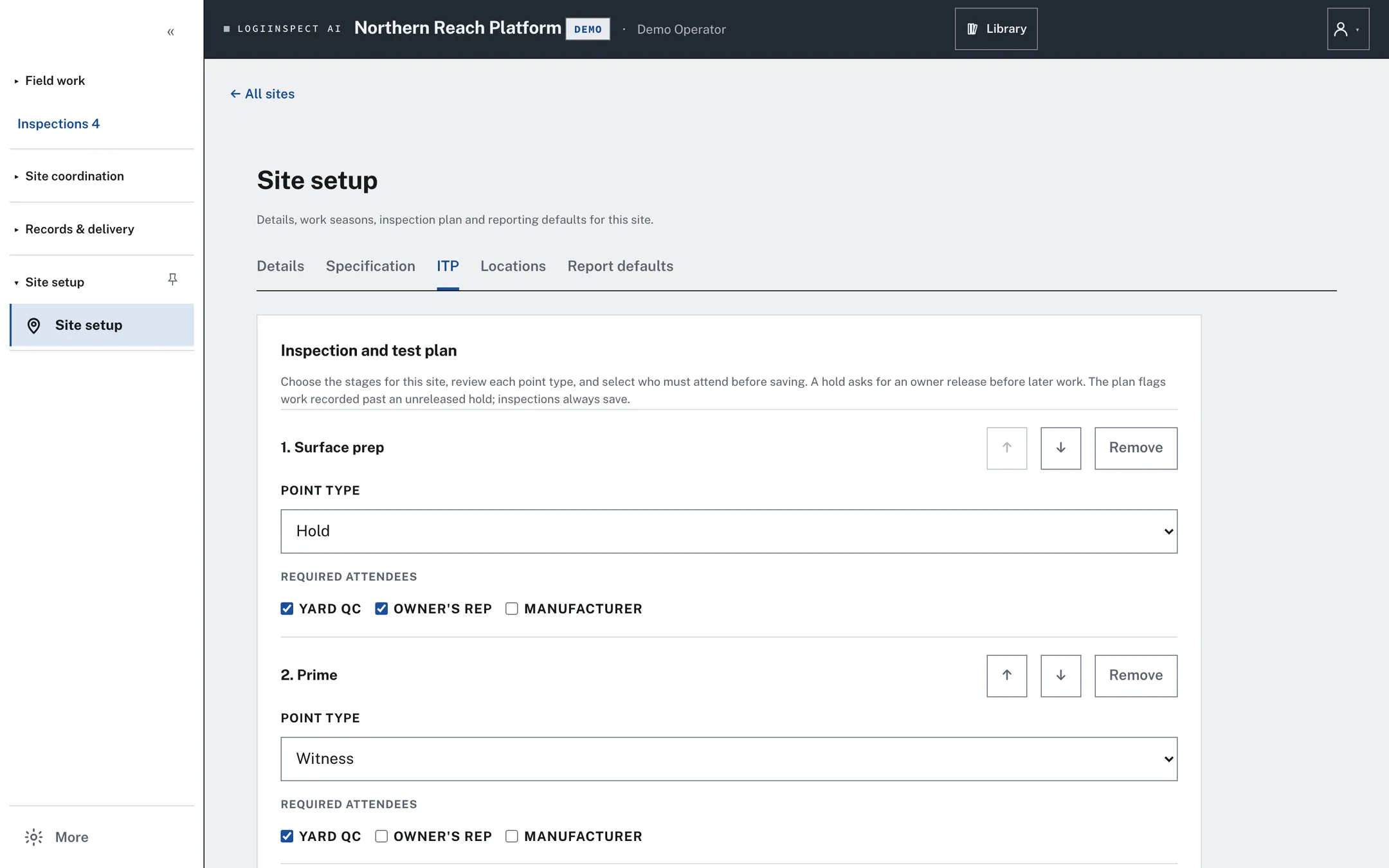
| Inspection & test plan | Hold, witness and review points for each stage, and which parties must attend. Per site. |
| Report defaults | Which check results print, and the date reports start from. Per site. |
| Units, time zone, seasons | Mils or microns, the clock records print in, and work windows. A winter shutdown can be one season across two years. |
| JSA template | A starting point: edit, delete or add any row, for one day or for good. |
Made for a tank with no signal and a gauge with a flat battery.
- A whole shift offline. Work is saved on the device as it's entered and sent when the signal returns. Captured work is never discarded; a refusal from the server is shown with a reference code.
- Hand entry, always. No reading depends on a gauge, a pairing or an import.
- Spanish screens for the field crew, with the office staying in English.
- Help is the manual. Search it, or ask it a question in plain words, and it can take you to the screen.
- Platforms: the web app on any computer or tablet; the iPhone and iPad app through Apple TestFlight; Android as an installable web app.